
Access control in community pools
Bikubo offers a system that lets you control the pool capacity, so you always know the number of users inside, and the historical maximum number of users in the different time slots of each day.
Bikubo offers a system that lets you control the pool capacity, so you always know the number of users inside, and the historical maximum number of users in the different time slots of each day.
Card generation is supported with different variable fields for each one (user name, data associated with the home, ID, photo, …). These cards can be sent by email in bulk using an Excel file, or printed in different formats (laminatable paper, PVC, …). Each card has a locator associated, contained in a QR, or in an RFID or NFC chip, so it can be read by our validation systems.
We offer several types of solutions for pool capacity control:

 Create user categories by days or time slots
Configure different access by card type
Modify permissions at any time
Create user categories by days or time slots
Configure different access by card type
Modify permissions at any time
 Users reserve time slots online
The administrator manages and limits capacity per time slot
Full access control from the intranet
Users reserve time slots online
The administrator manages and limits capacity per time slot
Full access control from the intranet
 Free entry while capacity is available
Control by time slots
If the limit is exceeded, the system indicates who must leave (by time and FIFO
order)
Free entry while capacity is available
Control by time slots
If the limit is exceeded, the system indicates who must leave (by time and FIFO
order)
Pool users have an informative web page where they can check the capacity status. Through this online access, the current occupancy is shown using a traffic light code.

Our system includes an intranet for the administrator, which allows the following:

Incident management, where you can deactivate lost or stolen cards temporarily, by dates, or permanently.

Quickly generate a new card for each user.

You can list, for each user, the accesses they have had to the pool.

Configure time slots for the reservation system, and also the parameters with the number of allowed reservations.
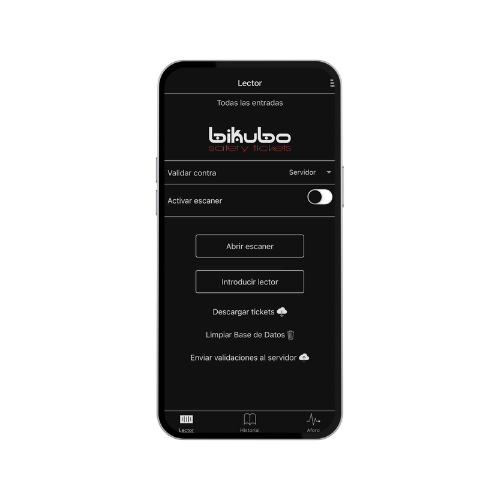
The access control system can be based on reading QR codes or reading the card's RFID. With a tablet connected to the internet, control can be performed, and if RFID reading is required, by attaching a reader to the tablet, the system would work automatically. The reading system allows the following functions:

Capture the card's QR code or read the RFID chip.
Verify the card as authorized for access.
Verify capacity availability.

Access allowed with update of the access log and capacity.

Access denied due to full capacity. The accredited person who must leave is shown, in this order:

Accredited user who has been inside for more than one time slot
FIFO queue with accredited users who have finished their time slot

Capture the card's QR code or read the RFID chip.

Release capacity.

Securely manage the entry of companions to the facilities.
Guest cards: each user has configurable cards to allow their companions to access.
Flexible configuration: define the maximum number of guests allowed per user or per day.

Linked control: allow guest access only while the accredited user is inside; upon exit, the system can notify that their guests must leave as well.

Access conditions: set custom restrictions by days of the week and time slots.
Bikubo enables integrating turnstiles and automatic doors for secure and automated pool access. The system validates cards or QR codes in real time, updates capacity, and can be configured for different entry and exit points.

Create multiple control points for general access or specific areas.
Define the maximum number of validations per point according to capacity.
Configure automatic validations based on time of day.
Group access points to prevent a user from validating at more than one door.
Set conditions between points, such as mandatory prior accesses.
Control entries and exits with logging and real-time capacity updates.

Below is the system price per user, for the entire swimming season, according to the number of users requested:

No. of users
No. of users
No. of users